
Overview
Colrows Signals are designed to automate routine data delivery and validation tasks. In many enterprises, staff manually check if certain data conditions are met and, if so, retrieve and process the data to gain insights. Colrows Signals aim to automate this process. When a data condition is satisfied, a signal is generated—hence the name "Signal."
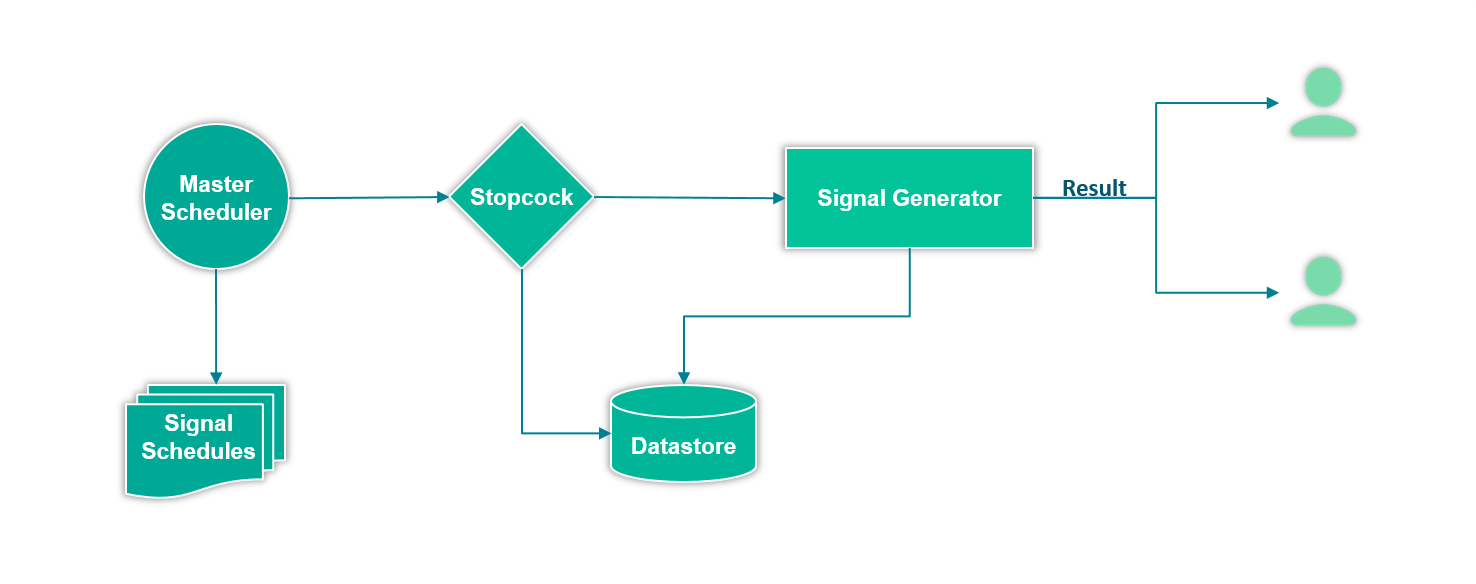
The configurations required to define a new Signal in the system has four parts-
- General
- Stopcock
- Result
- Schedule
General
The section requires the signal name and recipients list.
Name
A string literal that describes this Signal. The name must be unique within the system's list of signals.
Recipients
A list of email addresses that will receive the results of this signal.
Stopcock
Stopcock is the data condition that determines whether the Signal will be triggered. In other words, Stopcock defines a predicate, and if it evaluates to true, the Signal will be generated.
Stopcock definition has four parts-
Datasource
One of the datasource in Colrows. The data query will be executed against the selected datasource.
Schema
Schema (if supported by the selected data source) in the chosen data source. If a schema is selected, Colrows will set it as the default schema for the connection, allowing SQL queries to omit schema qualifications for database objects.
There is no need to specify schema if the SQL query has all the database objects already qualified with the schema name.
SQL Query
The SQL query that will be executed against the selected data source. Note that this is not the query whose results will be shared with recipients; rather, it is the query used to evaluate the stopcock predicate.
Predicate
A predicate is a JavaScript-based user-defined function that must always evaluate to a Boolean result. When the predicate UDF is executed, the result of the SQL query will be injected into the scope. The query result will be accessible as a JSON array in the variable $resultset.
Result
The result section captures the configuration to generate data which will be sent to recipients. The configurations are very similar to stopcock configurations.
Datasource
One of the datasource in Colrows. The data query will be executed against the selected datasource.
Schema
Schema (if supported by the selected data source) in the chosen data source. If a schema is selected, Colrows will set it as the default schema for the connection, allowing SQL queries to omit schema qualifications for database objects.
There is no need to specify schema if the SQL query has all the database objects already qualified with the schema name.
SQL Query
The SQL query that will be executed against the selected data source. The query result will be injected into the Transformation user-defined-function execution scope as a JSON Array with variable $resultset.
Transformation UDF
A JavaScript-based user-defined function that processes the SQL query result. The output must always be a JSON array of flat objects. Colrows will convert this JSON array into a CSV file and email it to the recipients.
Schedule
The schedule specifies how often the Signal should be executed. The Master Scheduler, which oversees all schedules in Colrows, triggers the execution based on this schedule. During the process, Colrows first evaluates the Stopcock; if it returns true, the data query and transformation logic are performed. The resulting data is then sent to recipients as a CSV file.
Following attributes define a Signal schedule-
Execute At
A list of specific moments during the day in 24-hour format when the Signal execution will be triggered. For example, a valid list of such times will be 10:05, 12:08, 17:30, 22:45.
Every
A frequency (regular time interval) when the Signal execution will be triggered. ‘Execute At’ and 'Every' are mutually exclusive i.e. only one of them must be specified.
Day Cron Expression
A cron-like expression for specifying a schedule with three values separated by a single space, where the first value denotes the day of the month, the second indicates the month, and the third signifies the week of the year.
Below are few examples:
  * * * => Every day of every month
  23 * * => 23rd of every month
  2-12 4-6 * => From 2nd to 12th in month of April, May and June
  2,3,4 2,3,9 * => 2nd, 3rd and 4th of Feb, March and September
  ? * FRI => Every Friday
Timezone
A timezone associated with all the time values in this configurations.